There’s a ritual every developer knows. You finish a feature. You stop. You alt-tab to a browser. You wait for Jira to load. You click into the right project. You find your ticket. You drag it across a board. You add a comment. You close the tab. You alt-tab back to your editor. You forget what you were doing.
Multiply that by a hundred tickets a sprint and you have an industry built on micro-interruptions.
I built Pad because I was tired of it.
The thesis
Most project management tools are designed for the people watching the work, not the people doing it.
That sounds like a swipe at PMs. It’s not. The PM does need a board. They need swimlanes. They need rollups for next week’s stakeholder review. The tools serve them well.
What the tools don’t serve well is the developer who just wrote the code. For that person, the tool is friction tax — overhead they pay to keep someone else’s dashboard accurate.
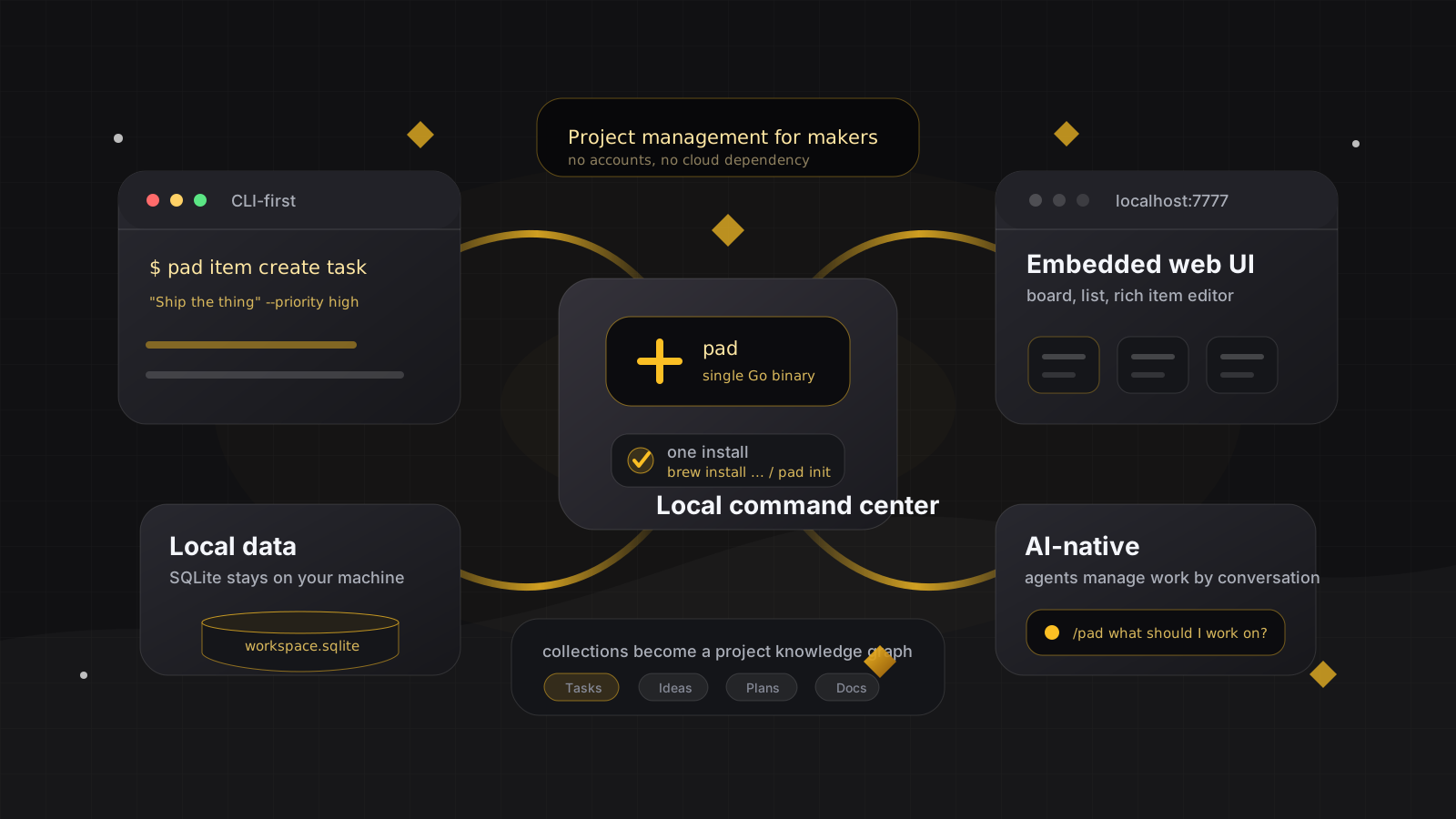
Pad inverts the priority. The maker’s flow comes first. If a manager wants a board, they can have one (we ship a full SvelteKit app embedded in the same binary). But every design choice, when those two interests conflicted, we picked the maker.
Five principles
These are the rules I tried to encode.
1. Stay in the editor
Status changes happen with pad item update TASK-5 --status done from the same terminal you ship code from. Or — and this is the part I’m most proud of — they happen because you said “I’m done with TASK-5” to your AI agent and the agent did it for you.
There is no required browser visit. Ever.
2. Your data, in a file you can read
Pad stores everything in a single SQLite database. Want to back it up? cp. Want to migrate to a different tool? Open the file in sqlite3 and dump tables to JSON. There is no proprietary format, no vendor lock-in, no “export request that takes 7 business days.”
3. Low ceremony
No estimates field by default. No story points. No velocity report. No required swimlanes. The schema for a Task is title, status, priority, due_date, effort, content. That’s it. If you want more structure, define a custom collection — but the default is small. The default is whatever you’d write on an index card.
4. Agents are first-class
This is the differentiator nobody else is building.
Pad ships with a single natural-language entry point — a /pad skill — for Claude Code, Cursor, Windsurf, Codex, Copilot, and others. You don’t learn a CLI. You don’t navigate a menu. You say “what’s blocking us?” and the agent translates that to the right query, runs it, and tells you.
The skill is in the binary. Conventions and Playbooks let your team encode rules that every agent in your project follows automatically — “run the tests before marking a task done,” “use conventional commits,” “tag the release in the changelog.” Write the rule once; every agent obeys.
5. One artifact ships everything
Pad is a single Go binary. No Docker. No Postgres. No .env configuration ritual. brew install, pad init, you’re done. The web UI is embedded. The API is embedded. The agent skill is embedded. If you can install a CLI, you can install Pad.
What we deliberately didn’t build
Manifestos are easier to write than features. So here’s the harder version: things we said no to.
- Gantt charts. They tell you nothing useful for software. The dependencies that matter are between tasks — those are first-class (
pad item block X Y). The dates? They’re guesses. Pad doesn’t pretend otherwise. - Time tracking. No timer, no hours field, no weekly logging UI. If your job requires it, use a different tool — we won’t fight you, but we won’t help.
- Resource management. Pad doesn’t model who’s “available” or at “85% capacity.” Those are managerial abstractions for spreadsheets, not for the people writing the code.
- Sprint ceremonies. No retrospective wizard, no planning poker, no velocity charts. You can write a doc, you can run
pad project standup, you can runpad project changelog. That’s the ceremony budget.
If you want those things — and many teams legitimately do — there are excellent tools for them. Pad isn’t trying to replace those tools for those teams. Pad is for the teams that wished they could just write the code.
Why now
The reason a tool like Pad couldn’t have existed five years ago isn’t technical. SQLite was around. Single binaries were around. Markdown was around.
It’s that agents make low-ceremony tracking actually viable.
The hidden cost of small, terse tools has always been the asymmetry: they’re great for the maker, but the manager can’t see anything. So the manager forces a richer tool, the maker pays the friction tax, and the cycle continues.
With agents, that cost goes away. The manager asks the agent “what shipped this week, what’s still in flight, what’s blocked?” The agent runs the queries and writes the summary. The maker never had to maintain richer fields to feed that summary. The data was already there because the agent put it there as work happened.
This is the part nobody’s pricing in yet. Project management tools designed for the agent era will look different — terser, more local, more API-first, less ceremony. Pad is one bet on what that looks like.
An invitation
Pad is Apache 2.0. Free for local use, free to self-host, paid only if you want our managed Cloud version (which is also free to start). If this resonates — if you’ve ever finished a feature and dreaded the alt-tab to Jira — try it.
If it doesn’t resonate, tell me why. Open an issue at github.com/PerpetualSoftware/pad. The strongest critiques will end up in the next post.
brew install PerpetualSoftware/tap/pad
pad init
Now go ship something.